2015 Book 5: How Google Works

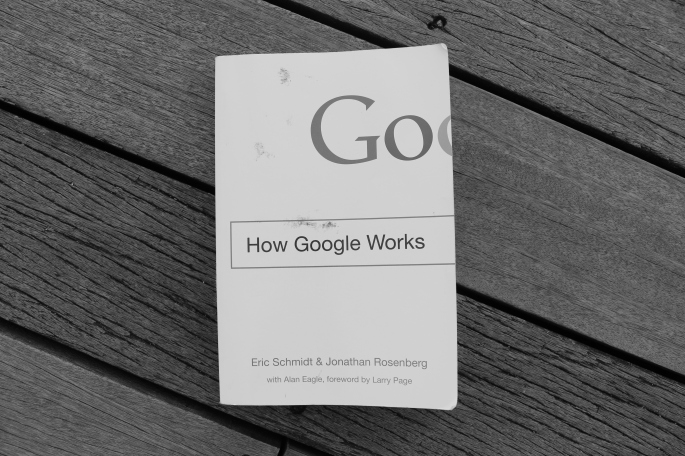
IMG_5022

by Eric Schmidt and Jonathan Rosenberg with Alan Eagle

For starters, How Google Works is a management book. In fact, I stumbled upon it in the business section of the bookstore. It was written by two leaders reflecting on how their company hires, value its employees, come up with important decisions, builds its portfolio, and define the company culture among others.

You would want to read this book if you are a manager or desire to be one someday. If you are one of the brave and fortunate enough to set up her own business (within the IT industry or not), you will sure to find gems of advise and inspiration among the pages of this book. If you have reached a decision-making position, then this book can give you insights on what may or many not work for a company in the Internet Century. Finally, if you are simply one who enjoys thought-provoking materials then having a peek inside one of the world’s best companies is time well spent.

How Google Works is close to my heart not only because I believe that Google is great a company in many ways I can argue but also that my profession belongs to the same industry. I will then take this review as an opportunity to add anecdotes and dimensions to some points raised in the book based on my own experiences working in Corporate IT. I’m writing from a perspective of someone who has only played technical roles and has worked in several multi-national companies in Singapore and the Philippines, so consider that as my vantage point.

Finally, I tried not to in my previous reviews, but I will drop some quotes from this book for a change. I will indent and italicized them so spoiler-haters like me can opt and easily identify which lines to skip. What I am really trying to say for the past n paragraphs is that this post will be relatively long so go get your popcorn or drop out now, otherwise, let’s get started. 🙂

On Smart Creatives

The book had me at “smart creative”, a term they use to call the kind of people who work for them and the kind they search to join their company. Modesty aside, the section describing a smart creative feels like a song dedicated to professionals like me. I could put a melody on it and sing it to myself over and over again. I could print it out, put in a frame, and hang it on my wall. The point is not to say that Google should hire me (I was given that chance, and obviously I didn’t make it), but that a female with communication skills can also be the same person a team depends on for technical expertise. The section was also a reminder that staying late in office doesn’t always mean inefficiency, but can also show how much time a person is willing to dedicate to her craft. Here are my favorite quotes from that section:

“She is driven to be great, and that doesn’t happen 9-to-5”

..because no matter how hard you try, you can’t tell people like that how to think. If you can’t tell someone how to think then you have to learn to manage the environment  where they think. And make it a place where they want to come every day.”

On Culture

Google promotes a culture of Fun and Yes. A culture where teams are organized around people who matters and contribute the most. The chapter on culture also introduced me to the word knave – which by definition means “a dishonest or unscrupulous man”. Knaves are people who make their co-workers lives’ miserable and great contributors to why smart creatives leave a company. Knaves are people who we usually call with the A* and the B* words. The problem with the A* and B* words is that I can’t use them with my family, and to simply call a knave “a man or a woman in office” does not seem to justify the amount of evil this person do.

On Gangs of Knaves

Divas, the lesser evil cousin of knaves are also mentioned in the book, but instead of talking about them, I would like to add a third social persona – Gangs. A gang is a group of knaves, soon-to-be knaves and knaves wannabes within a team. Gang members support each other and only each other and put its members growth first before the rest of the team. Gangs are more toxic than individual knaves because their collective evil is stronger than the individual good of other team members. It is also worth noting that gangs only exist when there is NO meritocracy in the company. This absence is the air gangs breathe. The unfortunate truth is that they exist and even evolve. If you are not in the position to dissolve these gangs, the best thing you can do is stay as far away from them as possible. On the brighter side, I have met leaders who are smart enough to identify and break up gangs; those are the leaders you want to associate yourself with.

On Talent – Hiring and Keeping Them

Google illustrates in the book how much effort it gives in hiring the best people it can find and how it tries as a company to make them stay. The reality is: identifying good employees through a series of interviews and exams requires an investment of time and creativity not all company is willing to give. And getting good people in is just a beginning. A company needs to define career paths, evaluation criteria, training plans and other devices to manage its worker pool. These responsibilities do not directly generate money and obviously incur costs. A trending workaround to this dilemma is outsourcing. Outsourcing works by getting people work for a company via a third-party without the associated Human Resources cost. There are pros and cons of outsourcing that is out of the scope of this article, but I would like to point out a disadvantage related to talent.

Because of the lack or worse absence of proper evaluation on external personnel, the company may overlook smart creatives already working under them. This is more problematic when the company has gone beyond outsourcing operational personnel into outsourcing investment activities that is supposed to serve as the company’s competitive advantage. A smart creative in her right senses will not settle in an environment where all her efforts go into a black hole. And when she leaves she takes her expertise, efficiency, ideas, and mentoring experiences with her. She will leave footprints too big for those she left behind to fill.

Let me end this topic by a quote below from the book:

“While A’s tend to hire A’s, B’s hire not just B’s, but C’s and D’s too. So if you compromise standards or make a mistake and hire a B, pretty soon you’ll have B’s, C’s, and even D’s in your company.” 

What else is there?

The 2nd half of the book focused on decision-making, communication and innovation aspects of a business. Instead of expanding on these topics, I would like to encourage the leader readers of this review and hopefully of the book to take a step back and re-assess his or her own company’s leadership style.

It is easier to be on defensive side and say that Google can afford to work the way described in the book because it is Google. Perhaps it would be more helpful to think that Google is Google because of the way it works.

Will I recommend this book to a friend? I think you already know the answer. 🙂

2015 Book 1: The Art of Thinking Clearly by Rolf Dobelli

IMG_3985

First of all, contrary to what the title suggests, it is not a methodical book which describes to its readers the actual art of thinking clearly. What it contains are 99 chapters about the fallacies, biases, effects, illusions, tendencies, and misconceptions of the modern day society.

The contents of the book are without a doubt interesting, but the format is what turns me off. Each chapter is a mini essay with a definition, proofs or examples, and conclusion/s all in 3 (roughly a thousand words in total) pages. Although possible, it’s less likely to explore an idea in detail – confirmation bias, for example – in such very short passages. Instead of ending each chapter with references to other chapters of related topic, the author could have gathered his points, organized the pros and cons, and elaborated an idea in longer but unified sections. This approach would have made his conclusions more convincing. There are other points, however, that makes his conclusions less convincing.

Since the book covers an array of topics, the author disclaimed that there are too may references to include in the book. Aside from the explicit quotes of other authors such as Mark Twain and Nassim Taleb, most claims do not include notes or citations. For a book that states “news is irrelevant”, you would expect a reasoning based on facts and studies.

Speaking of Nassim Taleb, well, Nassim Taleb was heavily mentioned in the book. At some point you could think that The Art of Thinking Clearly is a celebration of Nassim Taleb’s works. That thought might be an exaggeration, but do not be surprise if you (like me) end up getting a copy any of Taleb’s books yourself.

In summary, The Art of Thinking Clearly did not meet my perhaps very high expectations. My most important take-away from reading this book was the difficulty of giving a review on something I didn’t particularly enjoy.

Will I recommend this book to a friend? Not really.

Human-Centered Design and The Wallet Project

https://www.flickr.com/photos/55674398@N06/15956779184/
*leather wallets from Chinatown Singapore, photo taken by yours truly

What comes to your mind when you hear the word design? Color, shape, packaging? In many industries, design is often misinterpreted as the visual layer of a product. The fact that aesthetics is the most obvious aspect end-users see in a product is perhaps the reason why product teams give it more attention. Indeed, how something looks like is part of design, but the functions, why and how those functions are made available to end-users are equally important aspects that are less discussed in many product design process.

Continue reading “Human-Centered Design and The Wallet Project”

2015 Book 4: All the light we cannot see by Anthony Doerr

IMG_4002

All the light we cannot see is the first fiction book I finished reading in 4 years. Moving to Singapore opened a new path for my professional career, and as I moved from .Net development to business intelligence I realized how much material needs to be studied fast to catch up. From then till early this year, I only read technical, career-related and “self-help” books.

To make sure I have enough in queue to continue my Book Reading habit of 2015, I went to Amazon. This emerald covered hardbound is the #1 fiction of 2014. It tells two stories in parallel – one of a curious boy in Germany and another of a blind girl in Paris – set during the World War 2.

All the light we cannot see lived up to my expectations and more. It is the kind of book you would read until 3 am in the morning, until your eyes can read no more. The pace of the stories are just right. There is enough suspense to make you look forward to the next chapter. The paragraphs are woven with harmony; every sentence a piece of an image of the scene the author wants his reader to see. If you are particularly fond of science, the ocean, and history, then this book has icings for you.

Will I recommend this book to a friend? Yes.

How to “downgrade” SQL Server Integration Services 2014 packages to 2012

The Problem

A few months back, I built an SSIS 2014 project using Visual Studio 2013 that is supposed to serve as a template for future data warehouse projects. Our servers are still in SQL Server 2012, but the upgrade has been approved and so it made sense to create the template project in VS 2013. Until one day, the template was needed for a new project, with the promised SQL Server 2014 upgrade not yet in sight. Since SSDT-BI 2013 is not backward-compatible with SQL Server 2012, I then had to downgrade the SSIS 2014 project so that people can use it using Visual Studio 2012 and deploy it to SQL Server 2012. There are no tools from Microsoft, no StackOverflow forum that gave the perfect answer and mattmasson has kept quiet about the topic. 😦

The Workaround (Summary)

Based on my observation (only  Microsoft can verify), excluding the upgraded components, there are three changes between the XML files of SSDT-BI 2012 and SSDT-BI 2014 dtsx packages.

  1. PackageFormatVersion

SSDT-BI 2012 VS 2012: DTS:Name=”PackageFormatVersion”>6

SSDT-BI 2014 VS 2013: DTS:Name=”PackageFormatVersion”>8

  1. The values used in ExecutableType properties

SSDT-BI 2012 VS 2012: DTS:ExecutableType=”SSIS.Package.3″

SSDT-BI 2014 VS 2013: DTS:ExecutableType=”Microsoft.Package”

  1. The values used in componentClassID attributes

SSDT-BI 2012 VS 2012: componentClassID=”{49928E82-9C4E-49F0-AABE-3812B82707EC}”

SSDT-BI 2014 VS 2013: componentClassID=”Microsoft.DerivedColumn”

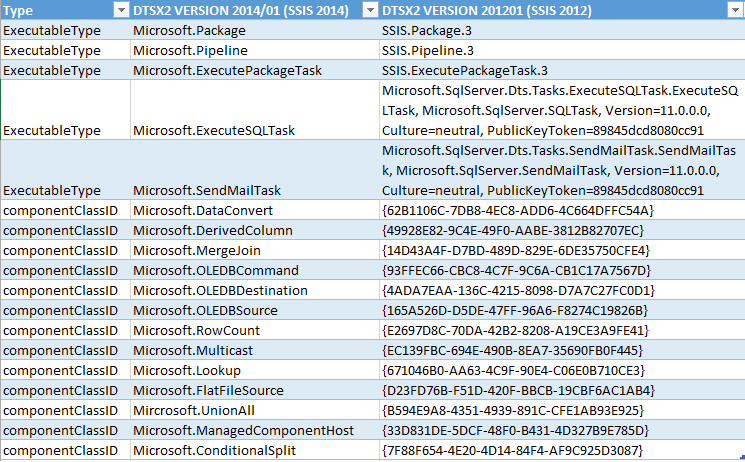
Have you guessed the fix already? You got it! It’s only a matter of find (all) and replace! Open the dtsx file in your favorite text editor (mine is  Notepad++) and replace the values used in the DTSX2 Version 2014/01 schema with the ones in DTSX  Version 2012/01 schema. 🙂 Now, there is some “manual labor” required, because you have to manually search for the componentClassIDs and ExecutableTypes in the DTSX  Version 2012/01 schema. Here are the ExecutableTypes and componentClassIDs I encountered so far. Click Replace.xls for an Excel version.

replace

 The Workaround (Step by Step)

  1. If you haven’t done so, open DTSX Version 2012/01 schema
  2. Open the SSDT-BI VS 2013 DTSX package in a text editor
  3. Search for PackageFormatVersion. Change the value from 8 to 6
  4. Replace all instances of Microsoft.Package with SSIS.Package.3
  5. Replace all instances of Microsoft.Pipeline with SSIS.Pipeline.3
  6. Search for all instances of DTS:ExecutableType=”
    unnamed
  7. For each ExecutableType value (Microsoft.ExecuteSQLTask, etc.), go to the DTSX Version 2012/01 schema and search under
    <xs:simpleType name="AnyNonPackageExecutableTypeExecutableTypeEnum">

    for the correct ExecutableType. For example, Microsoft.ExecuteSQLTask in SSIS 2014 should be Microsoft.SqlServer.Dts.Tasks.ExecuteSQLTask.ExecuteSQLTask, Microsoft.SqlServer.SQLTask, Version=11.0.0.0, Culture=neutral, PublicKeyToken=89845dcd8080cc9 in SSIS 2012.

  8. Replace ALL instances (including CreationName attributes) of the ExecutableType value with the one you got from Step 7
  9. Search for all instances of componentClassID=”Microsoft
    componentClassID
  10. For each componentClassID value (Microsoft.DerivedColumn, Microsoft.Lookup, etc.), go to the DTSX Version 2012/01 schema and search under
    <xs:simpleType name="PipelineComponentComponentClassIDEnum">

    for the corresponding GUID.

  11. Replace ALL instances (including CreationName attributes) of the componentClassID value with the one from Step 10.
  12. Now open the package in Visual Studio 2012. If your package does not have upgraded components, then it should open by now. Otherwise, read further.

The Exception

Some components, such as the Script Component in the Data Flow Task, have been upgraded from SSDT-BI 2012 to SSDT-BI 2014. In this case, it’s not only the property / attribute value that is different, but also the structure of the XML node. In this case, replace the Version 2014/01 schema value (e.g. componentClassID=”Microsoft.ManagedComponentHost”)  with any valid DTSX Version 2012/01 componentClassID. Then open the package in VS 2012. The component will be marked as with error, that’s OK. If you have followed all the steps above, your package should at least load the designer by now. Now remove this erroneous component and re-do it in VS 2012 itself.

Conclusion

I  was able downgrade SSIS 2014 to SSIS 2012 packages by modifying the XML file manually. I downgraded 15 packages in 4 hours including finding the workaround described above. It should be faster if you already know what to do. This approach seems more reasonable than re-creating all the packages I designed and developed for weeks with all their DFTs and expressions. No, thank you. Let me know if you encounter any other exceptions or if any of the steps above is not clear.

2015 Book 3: Quiet By Susan Cain

IMG_3995

Quiet is a book for introverts by an introvert. Susan Cain, a former Wall Street lawyer, started the book by describing the physiological aspect of introversion. Using research after research, she tells stories of how a natural “introversion” can be nurtured by an environment for the good or the bad. She tries to explain how introverts, often referred to as “shy people” (which in psychology is not necessarily the same), sees and reacts to the world. She wrote of circumstances when an introvert leader may be better than an extrovert one and vice versa, how a manager can extract the most potential from an introvert subordinate and even how a parent may raise an introvert child.

My self diagnosis is that I am NOT an introvert. But you don’t have to be one to enjoy the book. If you have loved ones, colleagues or anybody close you think falls in this personality category, I would recommend that you read this book. It brings forth the perspective of one third to one half of the world population. People who end up becoming scientists, musicians, artists, educators, engineers and many other professions that require solitude to perform.

Quiet

Will I recommend this book to a friend? Yes.

Deploy a SQL Server Analysis Services Project using PowerShell

Step 1: Build SQL Server Analysis Services solution using devenv /build, for example

“<path>\devenv.com” AdventureWorksSSAS.sln /build Development

In the bin folder of your solution, you should find <projName>.asdatabase, <projName>.deploymentoptions, <projName>.deploymenttargets and <projName>.configsettings XML files

Step 2: Generate XMLA script using Microsoft.AnalysisServices.Deployment.exe

Microsoft.AnalysisServices.Deployment.exe <path>\AdventureWorksSSAS.asdatabase /s:GenerateXmla.log /o:SSASDatabase.xmla

Step 3. Execute XMLA on target server using PowerShell script.

[System.Reflection.Assembly]::LoadWithPartialName(“Microsoft.AnalysisServices.AdomdClient”)

# Read the target server from .deploymenttargets file generated in Step 1

$DeploymentTargetsFile = <path to <projName>.deploymenttargets>

$deploymentTargets = [xml](Get-Content $DeploymentTargetsFile)

# Connect to the server
$serverName = “Data Source=” + $deploymentTargets.DeploymentTarget.Server
$conn = New-Object Microsoft.AnalysisServices.AdomdClient.AdomdConnection $serverName
$conn.Open()

# Read XMLA
$xmla = Get-Content $XmlaPath

# Execute XMLA
$cmd = New-Object Microsoft.AnalysisServices.AdomdClient.AdomdCommand $xmla, $conn
return $cmd.ExecuteNonQuery();

And that’s it 🙂

All You Need To Know To Start Learning SQL Server Analysis Services

I have this rare opportunity to provide basic SSAS training to developers from another team. Being busy with my own projects, my manager and their manager agreed to have the training for only 3 hours. I met the would be trainees and their manager to understand their expectations, the developer profiles and the modeling technique their project use.

The developers have intermediate to advanced T-SQL skills and they expect that at the end of the 3-hour training, they would be able to comfortably navigate around the existing SSAS solution, understand basic concepts of dimensional modeling, create new dimensions and measures, modify the existing cubes and have the basic knowledge they need to dig deeper into SSAS themselves. Whew! Investigating further, I found their current solution uses multidimensional approach with SQL Server 2012. They have calculations and perspectives but do not (or maybe not yet) define partitions, aggregations and translations.

With those constraints in mind, I prepared the outline of my training using XMind.

Continue reading “All You Need To Know To Start Learning SQL Server Analysis Services”

[SSIS] Lookup Transformation – Full Cache option

Level: Intermediate

Lookup transformation is an essential ingredient of a Data Flow task accessing multiple database servers. I always use the Full Cache option when the reference table is small enough to be stored in memory. However, this caching option needs more than setting up your Lookup task to work. Here are few things to check when your Lookup transformation fails to detect a match you are expecting it to detect:

Case sensitivity – the columns being compared must have exactly the same case. Otherwise, the match will fail.

Solution: Use UPPER() OR LOWER() on BOTH the Lookup AND the pipeline columns

Continue reading “[SSIS] Lookup Transformation – Full Cache option”